
Gameplay features
Beyond telemetry, CerebRUST ships a set of optional gameplay modifications. They live under Configure → Gameplay mods in your server’s left-hand menu, one page per mod, with a dot on each tab showing whether it is on.
Like all settings, toggles apply live — within about 15 seconds, no reload.
Every mod can announce itself. Each page ends with Include in periodic messages and a line written for that mod, which joins your periodic messages while the mod is on. Off by default; edit the line to suit your server.
NPC Bases (beta)
Section titled “NPC Bases (beta)”Unowned, defended, loot-filled bases the server keeps a population of, so a quiet server still has something to raid. A base stands somewhere on the map, holds real loot in real containers, is guarded by scientists, and is locked — you get in by opening a wall, exactly as you would raid a player.
It is the only mod that puts things into your world rather than changing a number, so it starts off and stays off until you switch it on.
| Setting | Default | Notes |
|---|---|---|
| Enabled | Off | Nothing spawns while this is off |
| Bases to keep alive | 2 | 1–10. Each base is a few hundred entities |
| Minimum players online | 1 | Below this, standing bases are cleared away and none are placed |
| Remove a base after | Off (0) | 0–72 hours since anybody was last in it. Zero leaves them until a restart |
| Show on the in-game map | On | Marks standing bases on the map players open in game |
A background job checks every couple of minutes and tops the population back up, so a base that gets cleared is replaced within a few minutes rather than at the next wipe. A server restart clears every base, and a fresh set is placed as the server comes back — on a server that restarts daily, that is the rotation. Bases are kept at least 300 m apart, and never within 200 m of anything a player has built — the game server checks that against the live world immediately before building, not against a saved map.
Where they go
Section titled “Where they go”CerebRUST already works out where a base could stand on your map, from your wipe’s parsed world — flat, buildable ground, away from monuments, roads, rail and water. You can see those candidate spots yourself on Configure → Gameplay mods → NPC Bases, drawn over your map.
Each base only goes to a spot at least as wide as the base itself, so the large bases are not squeezed onto patches they cannot fit.
The plugin re-checks the ground before it builds, because the terrain grid is coarser than Rust’s building grid and cannot see rocks. A spot it refuses is remembered and skipped.
What is inside
Section titled “What is inside”Each base carries its own loot configuration, set by CerebRUST staff when the base is captured: how many of each kind of container to simulate, how much explosive to seed, how much upkeep to leave in the cupboard, and how hard the guards hit.
The loot is Rust’s own. Nothing is hand-written — the plugin rolls the actual loot table of a barrel, a green military crate, a supply drop or a Bradley crate, so what comes out is the distribution your players already know from monuments, and it follows Facepunch’s balance changes without anyone updating a list. Contents are rolled fresh on every spawn, so two bases from the same template are never the same base.
Loot is spread by theme rather than dumped in one box: resources to the cupboard, explosives near the middle, food to fridges. No single container is the whole prize.
The guards
Section titled “The guards”One scientist spawns per sleeping bag in the base, drawn from a weighted mix of four tiers — easy, medium, hard and heavy. They use Facepunch’s own AI and are leashed to the base, so they will not wander across the map or follow somebody home.
Killing one is not the end of it: while its bag is still standing, it respawns after two to three minutes, just as a player would — up to three times, so a bag cannot be camped for kits. Destroy the bags and the base stops fighting back sooner.
Things worth knowing
Section titled “Things worth knowing”- Nothing an NPC base contains is counted as a player’s. The bases do not appear on your Bases page, do not rank in the boom leaderboard and do not draw as player structures on the map. If they ever do, that is a bug — tell us.
- Raiding one is a raid. It lands in your raid list and your raid feed channel like any other, marked as an NPC base, and nobody is DMed about it because nobody owns it.
- They do not survive a restart. Bases are not saved with your world, so a restart clears any that were standing and the population refills afterwards.
- They do not collapse when you break their supports. An NPC base is placed rather than built block by block, so Rust’s stability system is switched off for it — blow a foundation and the walls above it stay where they are. It looks odd and it is deliberate: the alternative, as it stands, is bases that fall down on their own. Everything else about raiding one is normal.
- The marker says “Raidable Base”, never which base it is, so players find out by going. If
you set a removal time it also counts down —
Despawns 5h 42m— and the clock restarts whenever somebody is in the base, so a long raid is never cut short by it. - Destroying the tool cupboard beats the base. Its marker comes off the map at once and a fresh base is placed somewhere else, so the population stays full. The beaten one is left standing until the next restart, so the raiders can make as many trips home as they need.
- A base is never taken down with a player inside it. If one is due to go while somebody is raiding it, it simply stays until they leave. The same applies to a base you clear by lowering the number you keep alive.
- The in-game map marker is a real decision. On a big map with a handful of players it is what makes the feature findable at all; on a busy server it turns every spawn into a race to the pin. Both are reasonable and the switch is yours. It needs plugin v0.35.0 or newer — an older plugin ignores the setting and marks nothing.
- Your own Live feed map shows standing bases either way. That is not affected by the setting above: hiding bases from players should not stop you finding them yourself.
Gather rates
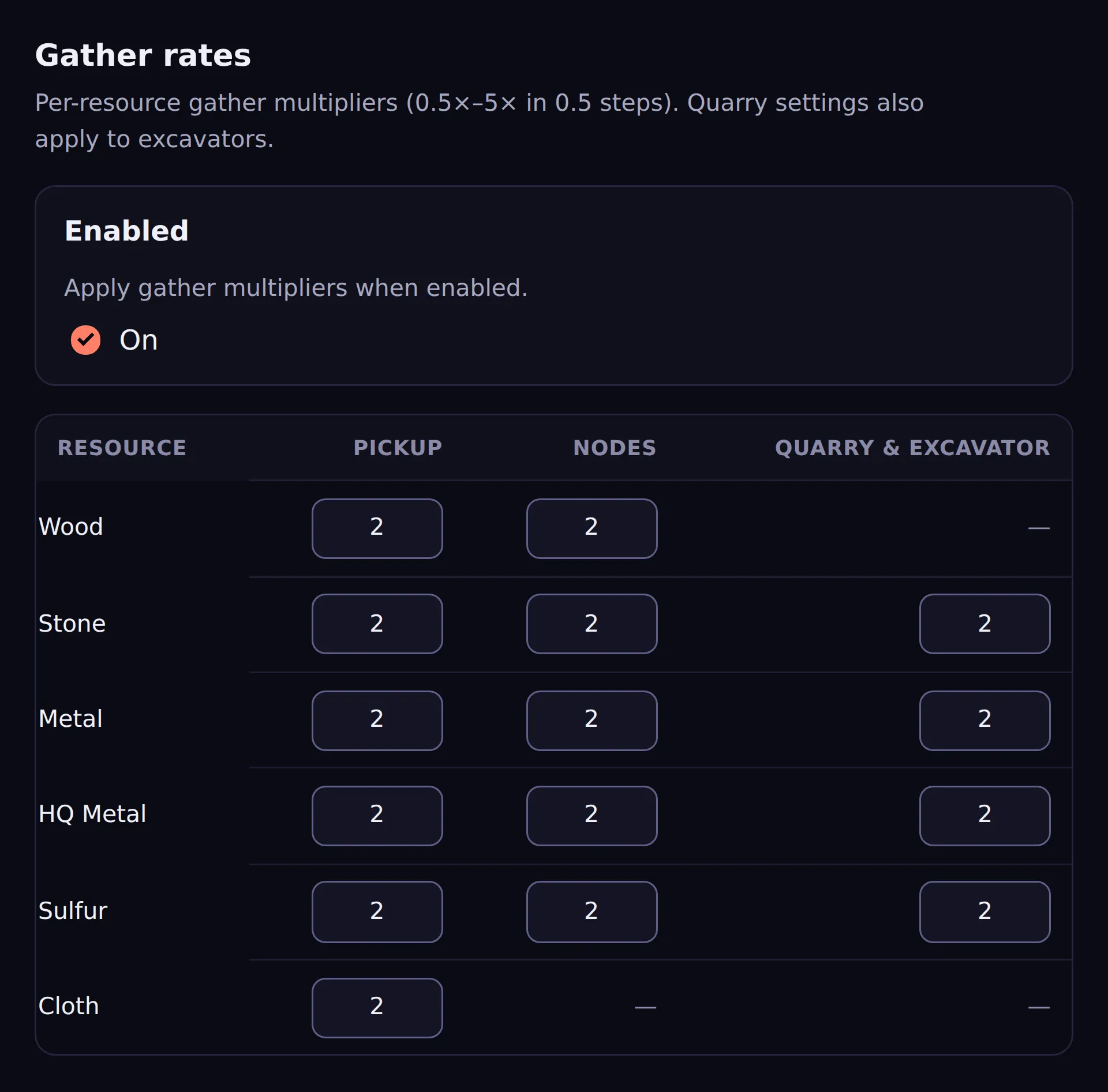
Section titled “Gather rates”Per-source, per-resource gather multipliers from 0.5× to 5×, in 0.5 steps, laid out as a grid: resources down the side, methods across the top.
- Pickup — items picked up off the ground (hemp, loose ore)
- Nodes — hitting rocks and trees
- Quarry & Excavator — mining quarries, and the Giant Excavator
| Pickup | Nodes | Quarry & Excavator | |
|---|---|---|---|
| Wood | ✅ | ✅ | — |
| Stone | ✅ | ✅ | ✅ |
| Metal | ✅ | ✅ | ✅ |
| HQ Metal | ✅ | ✅ | ✅ |
| Sulfur | ✅ | ✅ | ✅ |
| Cloth | ✅ | — | — |
A dash means Rust does not produce that resource that way — quarries and excavators yield no wood, and cloth only comes from picking hemp — so there is nothing to set.
So a 3× node rate with a 1× pickup rate is a perfectly valid combination, and often what you actually want.
Stack sizes
Section titled “Stack sizes”Raise the maximum stack size of any item in the game.
This used to be part of gather rates and shared its on/off switch. It is now its own mod, so you can run vanilla gather rates with big stacks, or multiplied gather with vanilla stacks — whichever you actually want.
Eleven items are listed by default, all at their vanilla sizes so nothing changes until you raise one:
| Item | Default |
|---|---|
| Wood, Stones, Metal Ore, Metal Fragments, Sulfur Ore, Sulfur, Cloth, Scrap, Charcoal | 1000 |
| High Quality Metal, High Quality Metal Ore | 100 |
Add whatever else you like. Search for an item by name and it is added with its vanilla stack size prefilled, ready for you to raise. If an item is too new to be in our list, type its shortname directly — it still works, and it will start showing its proper name once our list catches up.
Furnace boost
Section titled “Furnace boost”Speeds up smelting, with fuel burning proportionally faster. Multiplier is 1–4.
Auto fuel
Section titled “Auto fuel”Evenly splits ore across furnace input slots and automatically adds fuel from the player’s inventory when they insert ore. Pure quality-of-life; no settings.
Blueprint share
Section titled “Blueprint share”When a player researches a blueprint or unlocks one from the tech tree, their teammates get it too. No settings.
Stack recycling
Section titled “Stack recycling”Recyclers process a full stack in one cycle instead of 10% per tick. No settings.
Turret auth
Section titled “Turret auth”Keeps auto-turret authorisation in sync with the tool cupboard’s auth list, so authorising someone on the TC also authorises them on the base’s turrets.
| Setting | Default | Notes |
|---|---|---|
| Clear grace seconds | — | 5–120. Grace period before an auth clear takes effect |
The grace period exists to stop a momentary de-auth from instantly turning a base’s own turrets on its owners.
SAM auth
Section titled “SAM auth”Player-placed SAM sites ignore empty vehicles, and vehicles occupied by someone authorised on the TC. Stops your own SAMs shooting your minicopter, and stops them wasting ammo on abandoned vehicles. No settings.
Sort button
Section titled “Sort button”Adds a Sort button to storage containers the player owns. No settings.
Chat commands
Section titled “Chat commands”Two are always available, with no setting:
| Command | Does |
|---|---|
/pop |
Reports the current player count |
/time |
Reports the in-game time |
Two more are off by default and enabled under Gameplay mods:
| Command | Setting | Does |
|---|---|---|
/takelead |
takelead |
Lets a team member claim leadership — useful when the leader is offline |
/testgenerator |
testgenerator |
Lets players buy a small generator for scrap |
/testgenerator has two extra settings: the scrap cost (default 20,000) and whether to
broadcast the purchase server-wide (default on).
Always-on, not configurable
Section titled “Always-on, not configurable”These run regardless, because they only fire on events that have already happened:
- Targeting alerts — when a turret or SAM on a base acquires a hostile lock, everyone authorised on that base who has linked Discord gets a DM naming the grid it happened in and whose turret or SAM fired. It deliberately does not say who was detected. One alert per base per five minutes, not one per turret.
- Raid tracking and combat logging — raid damage and PvP hits are recorded for the raid timeline.
- Keycard swipes — recorded for the Card Swipes leaderboard. Staff-visible only; nothing is said in chat.
None of these change gameplay; all are observation.