Wiping your server
CerebRUST can run your wipes for you: a countdown players can see, a new map, and a check that your server actually came back on it. Everything about wiping lives on one page — Configure → Wipe — with five tabs:
| Tab | What it answers |
|---|---|
| Schedule | When this server wipes, whether or not CerebRUST is the one doing it. Plus the next five weeks. |
| Automation | Whether CerebRUST performs the wipe, and onto which map. |
| History | What actually happened — and the button that wipes now. |
| Save hygiene | The map files each wipe leaves behind on your server, and clearing them out. |
| Map library | Every world CerebRUST has parsed — search by what is on it, and queue one for your next wipe. |
What a wipe does
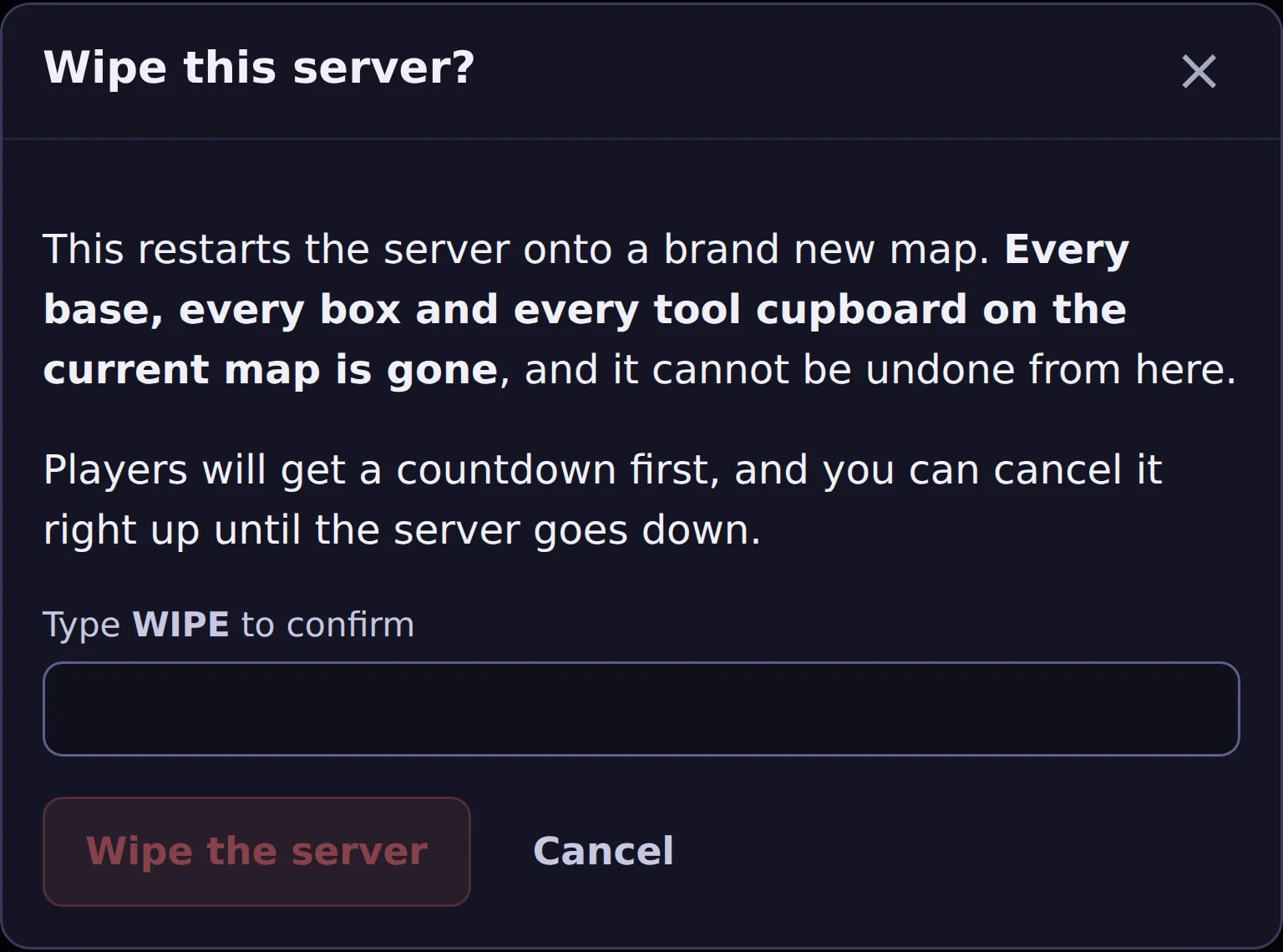
Section titled “What a wipe does”Press Wipe the server on the History tab and CerebRUST:
- Tells your players, in game, with a countdown.
- Rolls a new world seed and writes it wherever your host actually reads it from — your game
panel’s startup variables, your
server.cfg, or both. - Restarts your server gracefully — Rust’s own restart, so the world is saved and everyone gets a countdown rather than being dropped.
- Waits for your server to come back and report the new map.
Your server generates a fresh world on the way up. Every base on the old map is gone — that is what a wipe is, which is why the button asks you to type WIPE first.
Your Discord gets told, three times
Section titled “Your Discord gets told, three times”If you have pointed the Server lifecycle feed at a channel (Discord feeds), a wipe posts on its own as it happens:
| When | What lands |
|---|---|
| The moment the wipe starts | A card naming the new seed and map size, with a RustMaps preview link and a live countdown to the server going down. |
| When the countdown runs out | One line: the server is going down for the wipe now. |
| When your server comes back | The Server wiped card, once the new map has actually loaded. |
The first one goes out when the countdown starts — so players get the new map to look at while the in-game countdown is still running. Nothing is posted if that feed has no channel.
The old map’s files stay on your server
Section titled “The old map’s files stay on your server”Rolling the seed makes Rust generate a new world; it does not remove the old one. So each wipe leaves the previous map’s save files in your server directory. They are not large and nothing breaks — but over a lot of wipes they add up.
The Save hygiene tab is where you clear them out.
“Wiped” means your server said so
Section titled ““Wiped” means your server said so”This is the part worth knowing, because it is unusual.
CerebRUST does not mark a wipe done when it sends the restart. It marks it done when your server comes back, loads the new map, and its plugin reports a save that was created after the wipe started. Until that happens the run says waiting for the server to come back — not “nearly done”, because a server generating a world can still fail to return.
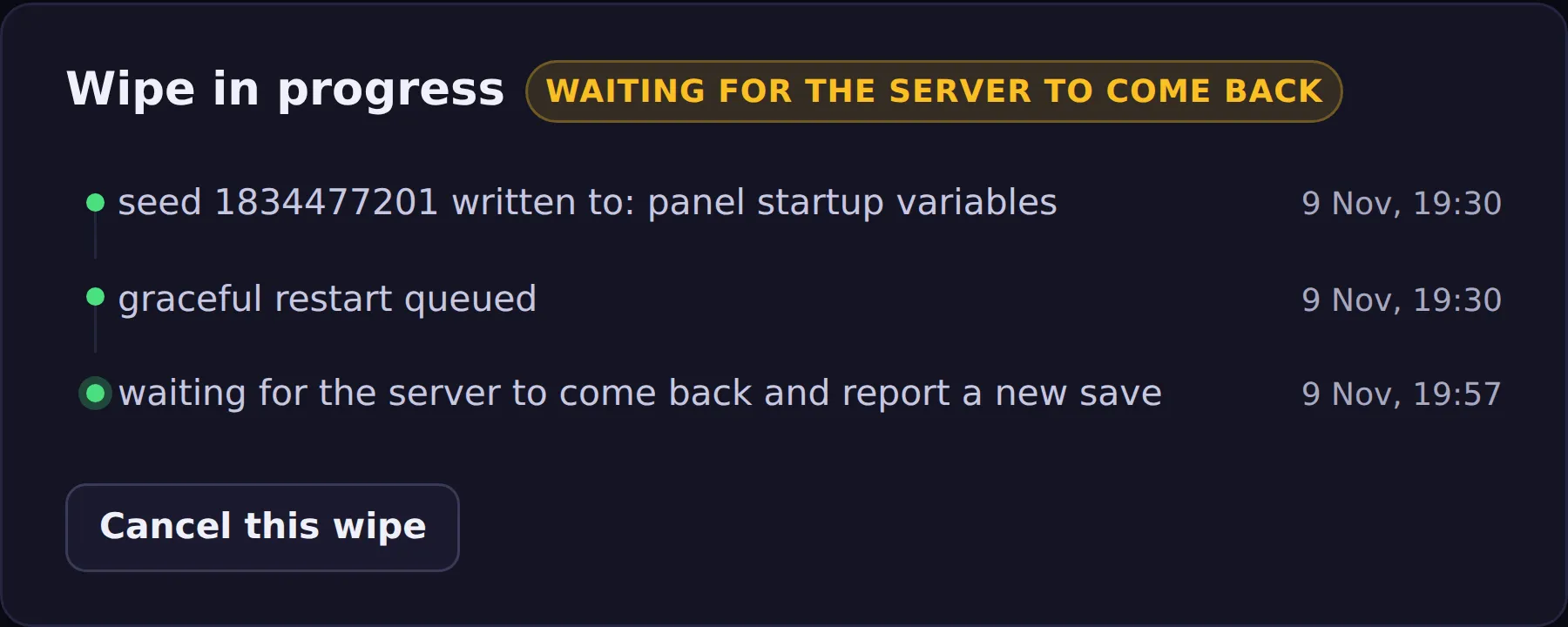
If it does not come back within 45 minutes the wipe is marked failed, and it says so rather than leaving a hopeful message on screen. That usually means your host did not restart the process; the panel’s Start button is what fixes it.
Any failure DMs your staff, the same way the day’s notice does — the reason CerebRUST recorded, and a link to the History tab. That covers more than the 45-minute timeout: a world seed that could not be written, a restart that could not be queued, anything that stops the wipe partway. You will also see it in the notification bell whether or not you have linked Discord.
Your wipe time is when the server is back, not when it goes down
Section titled “Your wipe time is when the server is back, not when it goes down”If you advertise a 9pm wipe, players turn up at 9pm expecting to play — not to watch a map generate. So CerebRUST works backwards from your wipe time rather than starting at it.
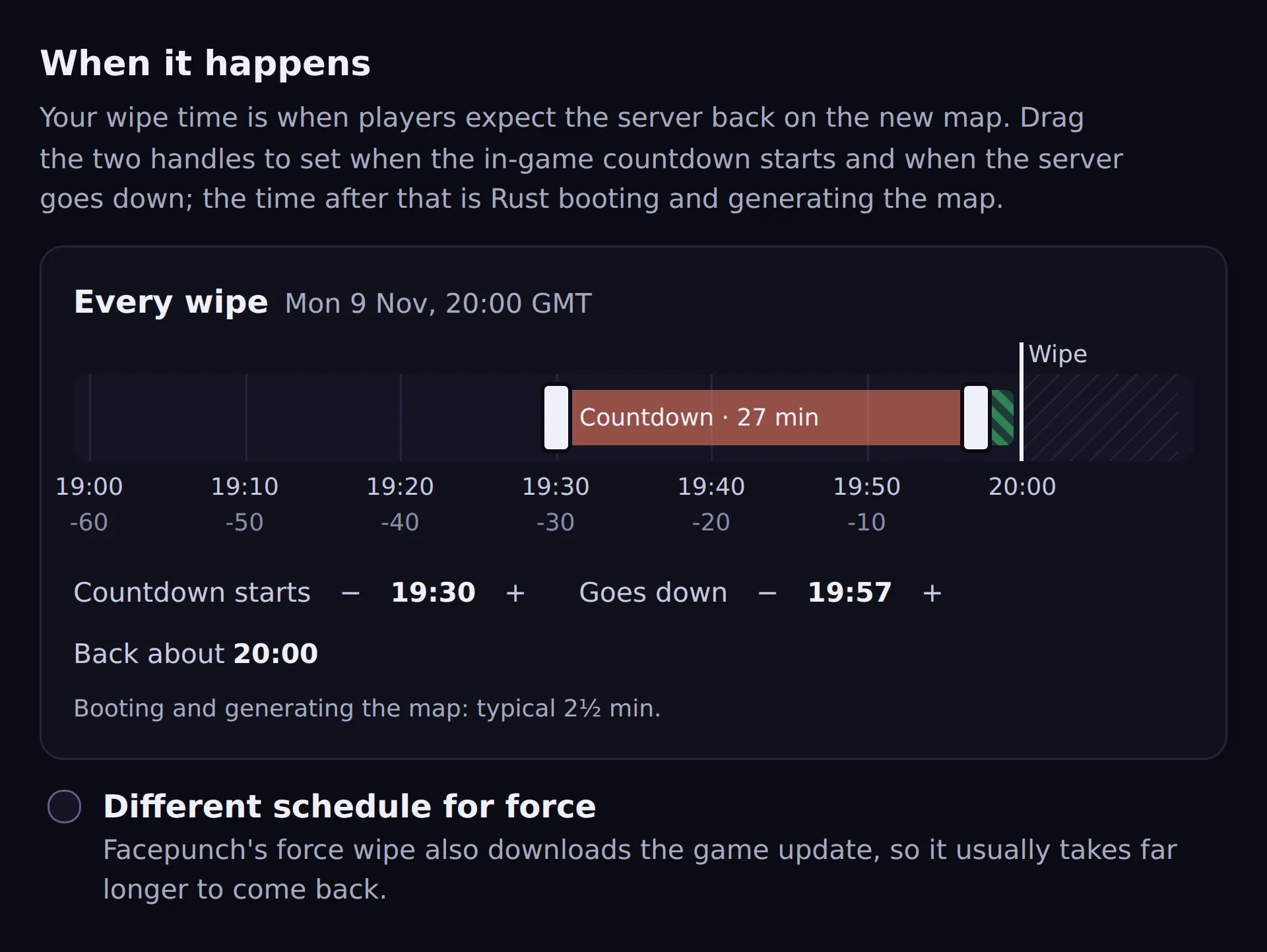
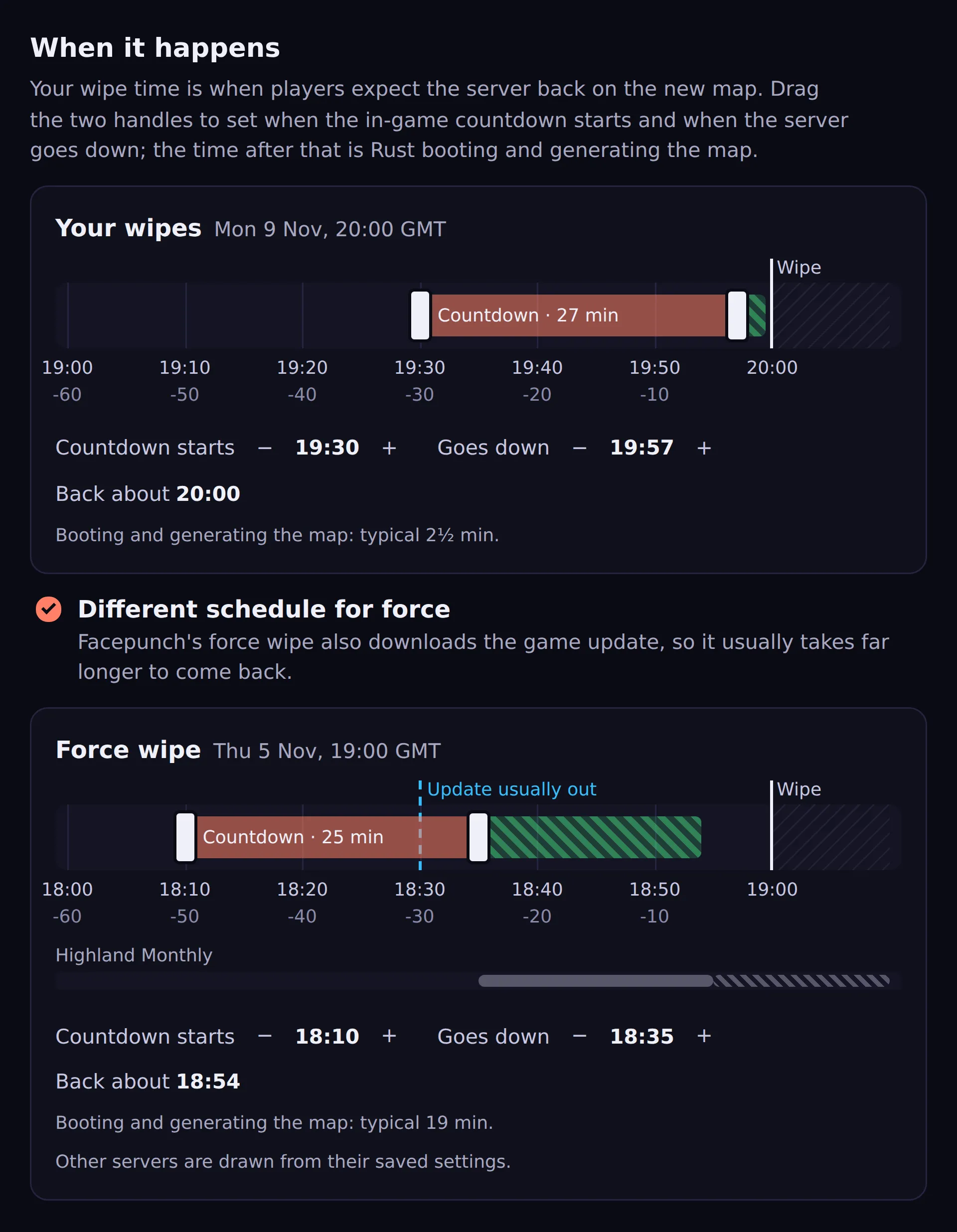
On the Automation tab, When it happens draws the hour before your wipe as a timeline that ends at your wipe time, with two handles on it:
- Countdown starts — when players start seeing the in-game countdown. Default 10 minutes before.
- Server goes down — when the countdown ends and the server restarts. Default 5 minutes before.
Whatever is left after Server goes down is Rust booting and generating the new world, drawn as a hatched band. Once your server has done a couple of wipes that band is its own measured time; if it runs past your wipe time it turns red and the line underneath says how late you would be back. Drag the handles, or use the − and + buttons beside each time for one minute at a time; the two handles cannot pass each other. Nothing is saved until you press Save.
You do not have to guess. Map generation time is driven mostly by world size and hardware, and both stay put on a given server, so a handful of wipes predicts the next one well — the History tab shows the figure too.
Wiping automatically
Section titled “Wiping automatically”On the Automation tab:
| Setting | What it does |
|---|---|
| Wipe automatically | Off by default. When on, CerebRUST wipes at each scheduled wipe time. |
| What to wipe | Map only, for now — see below. Blueprints go on force wipe regardless. |
| New map each wipe | Roll a fresh seed every wipe. |
| When it happens | The two handles above: when the countdown starts and when the server goes down. |
| Different schedule for force | A second timeline for force wipes. Not offered on a server that only wipes on force. |
The schedule supplies the when — CerebRUST does not ask you for a second one.
Cancelling
Section titled “Cancelling”A wipe can be called off right up until the server goes down, from the same page. If the in-game countdown is already running, cancelling stops that too.
Lining up maps
Section titled “Lining up maps”By default every wipe rolls a random seed and keeps your current map size. Default map size on the Automation tab changes that: set it to, say, 4000 and every wipe that nothing else decides lands on a 4000-metre map (0 keeps whatever size the server runs now). If you would rather choose the map itself, Maps lined up on the same tab is a list: the next wipe takes the top one and the rest move up.
An entry can set as much or as little as you like:
- A seed — that exact map next wipe.
- A size only — “make the next one 4000 metres, any seed”. The size box starts at your default map size, and an entry with no size uses the default when the wipe runs.
- Nothing at all — a random map at your default size that holds its place, so a seed you have lined up behind it waits a wipe.
- A level —
Barren, or a custom map, for one wipe. - A note, so you remember in three weeks why that seed was worth queueing.
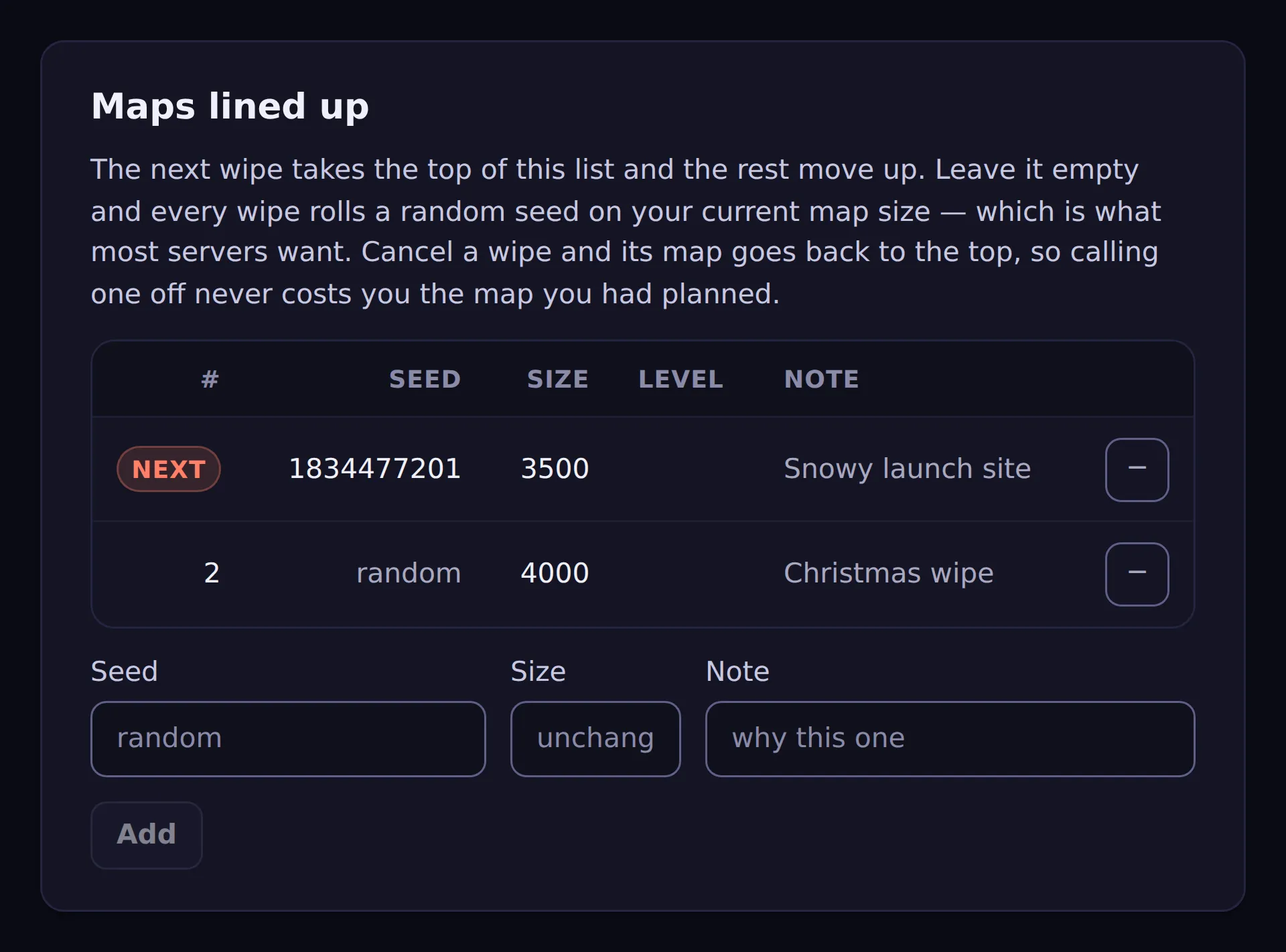
Cancel a wipe and its map goes back to the top of the list, so calling one off never costs you the map you had planned.
Picking one from the library instead
Section titled “Picking one from the library instead”Typing a seed in by hand works if you already know the seed you want. Usually you do not — so the Map library tab is the other way to fill the same list: search the worlds CerebRUST has parsed for what you want on them, and press Queue as next map.
See The map library for how the search works. With a default map size set, the library opens filtered to that size; remove the rule to see every size.
Leave the list empty and nothing changes — that is the normal state and what most servers want.
Your staff get a day’s notice
Section titled “Your staff get a day’s notice”Anyone with staff access to the server — you, your admins, and moderators assigned to it — gets a Discord DM about 24 hours before each wipe, if they have linked their Discord account.
It says when the wipe is, in their own timezone, and whether CerebRUST is going to perform it or is only predicting it.
That second part is the point. A wrong weekday, a timezone nobody revisited after the clocks changed, a force wipe somebody had forgotten — all of those look perfectly fine on a settings page and are obvious the moment you read “this wipes tomorrow at 8pm” and think no it doesn’t. A day is enough time to fix it. Ten minutes is not.
The next five weeks
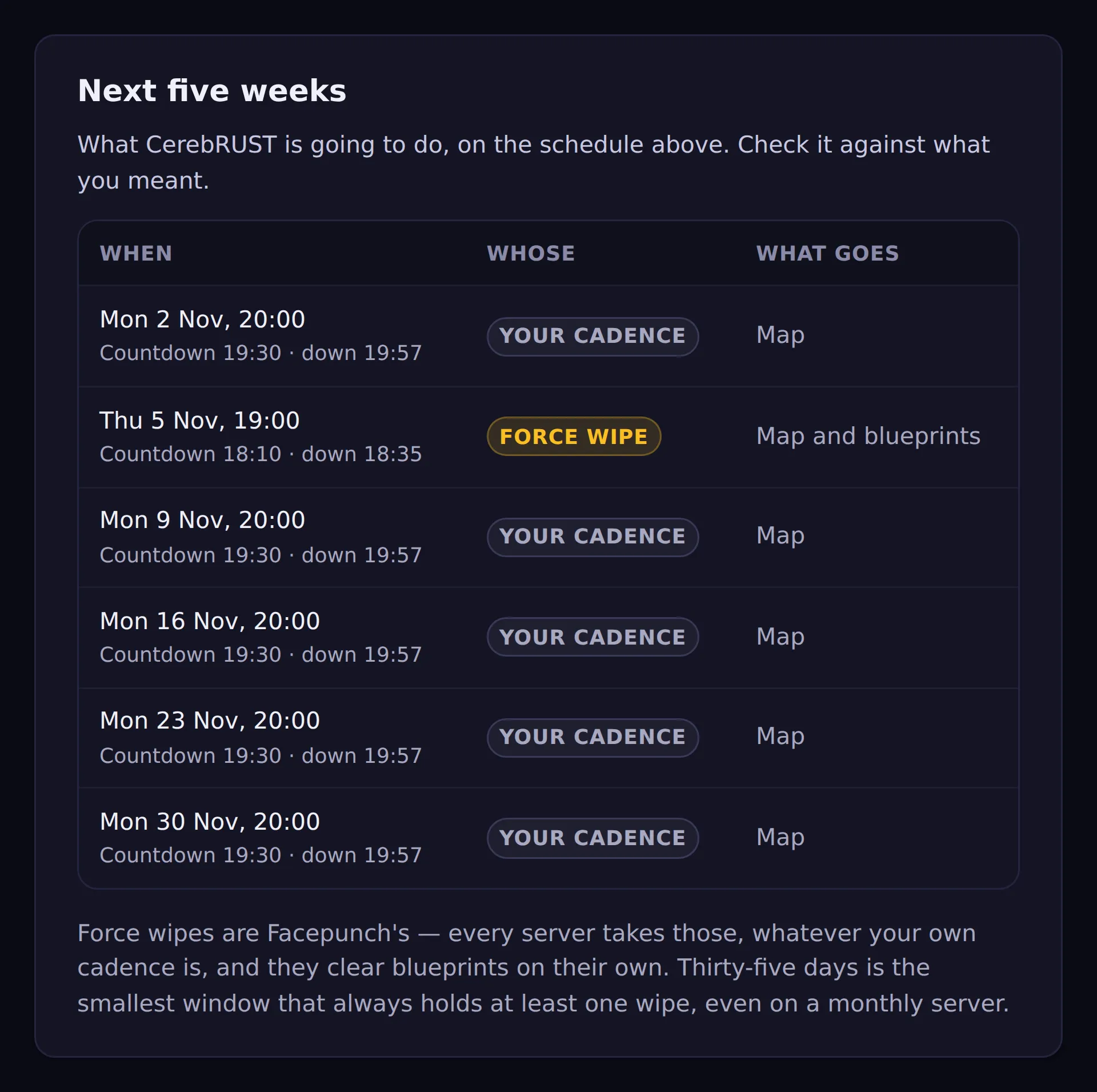
Section titled “The next five weeks”The Schedule tab lists every wipe your schedule produces over the next 35 days, with Facepunch’s force wipes marked. It is there so you can check the arithmetic rather than take it on trust — a Monday-wipe server also wipes on force-wipe Thursday, and seeing the two interleaved is the quickest way to confirm CerebRUST agrees with what you meant.
Thirty-five days is deliberate: a five-week month is the smallest window that always contains at least one wipe, even on a monthly server.
Force wipe
Section titled “Force wipe”Facepunch force-wipes on the first Thursday of each month at 7pm UK, and every server takes it — that is what “force” means. CerebRUST already knows this: your next wipe is whichever comes first, your own cadence or the force wipe. A Monday-wipe server that also wipes on force-wipe Thursday is handled without you configuring anything twice.
Timing is easier on force-wipe night than it looks: the server build is usually available from about 6:30pm UK and the client patch drops at 7pm, so a server that comes back at 7pm is ready exactly when players can connect.
Force wipe takes longer to come back
Section titled “Force wipe takes longer to come back”A force wipe downloads the game update on the way back up, so it usually takes far longer than your regular wipes — on the server this was built for, about 2½ minutes on a normal week against 22 on force wipe night. Tick Different schedule for force and a second timeline appears for force wipes only, starting from your regular timing. A server whose only wipe is the force wipe has just the one timeline, and it already is the force one.
The force timeline marks when Facepunch usually has the server build out, and warns if your server would go down before it: a server that restarts before the update is published comes back on the old version.
Two servers on one machine
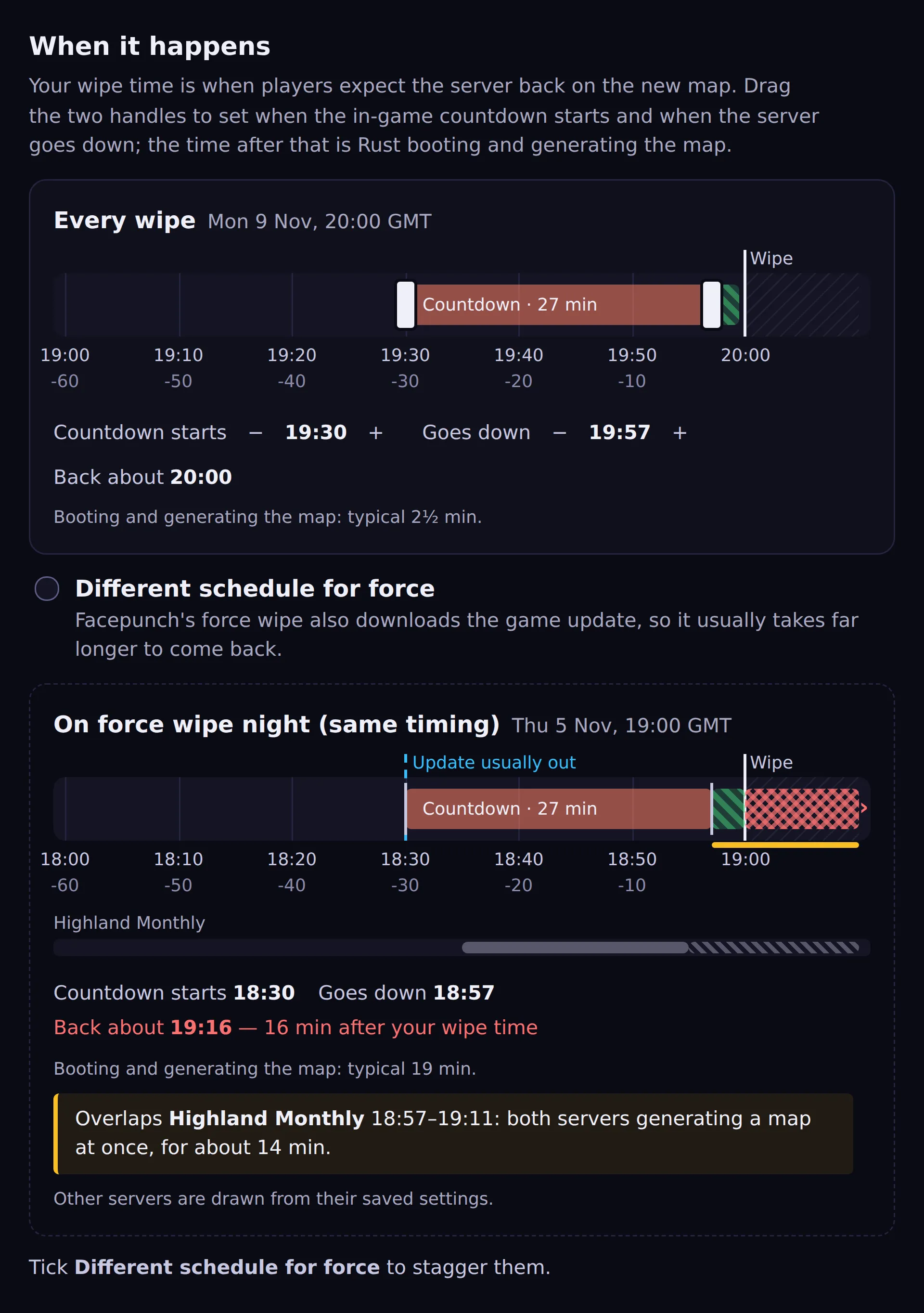
Section titled “Two servers on one machine”If other servers in your organisation run on the same machine — the same IP, different ports — the timeline draws them underneath yours, greyed out, from their saved settings. Force wipe is the one night they all restart at once, so this is where it matters: when two servers would be generating a map at the same time, the overlap is marked and named. Staggering them is a matter of dragging one server’s handles earlier until the warning goes away.
If you use one timing for every wipe, a read-only On force wipe night timeline still appears whenever another server on the machine wipes then, so the collision cannot hide behind the box you did not tick. Only servers you administer are shown, and never another customer’s server on the same host.
Force wipe takes the blueprints with it
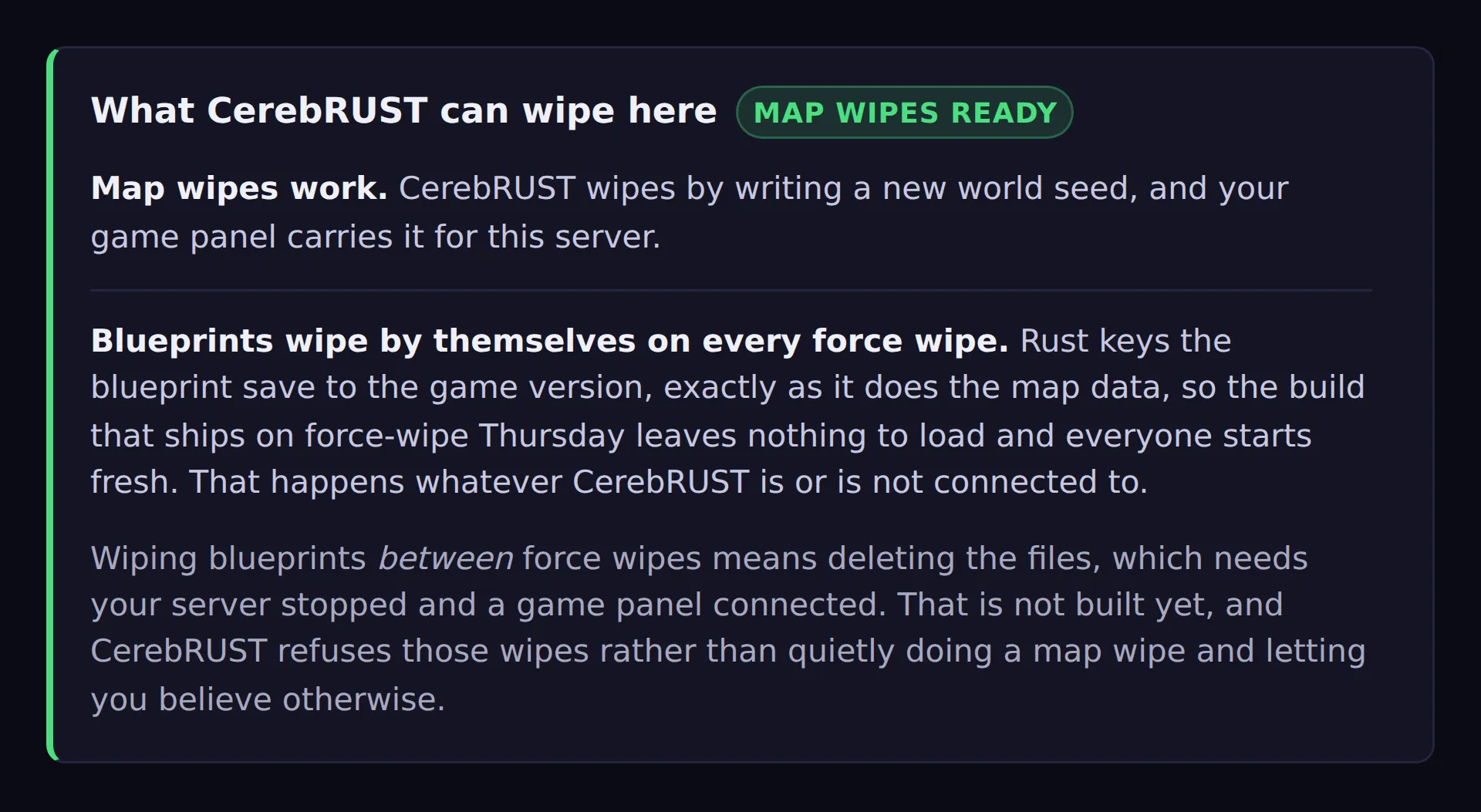
Section titled “Force wipe takes the blueprints with it”Blueprints wipe on every force wipe, whatever you or CerebRUST do. Facepunch changed this: the blueprint save file is keyed by the game version, exactly as the map data is. So the build that ships on force-wipe Thursday leaves your server with no blueprint file to load, and everybody starts from nothing.
Nothing configures that and nothing turns it off. It is worth knowing for two reasons:
- CerebRUST is not doing it, so do not go looking for the setting.
- It is most of what “wipe blueprints” means in practice. Every server already gets a monthly blueprint wipe for free, which makes the file clear below a much smaller gap than it sounds.
On the Schedule tab, force wipes in the next five weeks say Map and blueprints for exactly this reason.
Save hygiene
Section titled “Save hygiene”Every wipe leaves the previous map behind, and every game update leaves the previous version of some save files behind too. The Save hygiene tab lists what is on your server that nobody is playing on — old maps, and old versions of save files such as blueprints — grouped into the things you would decide about, with the space each one is using. You pick.
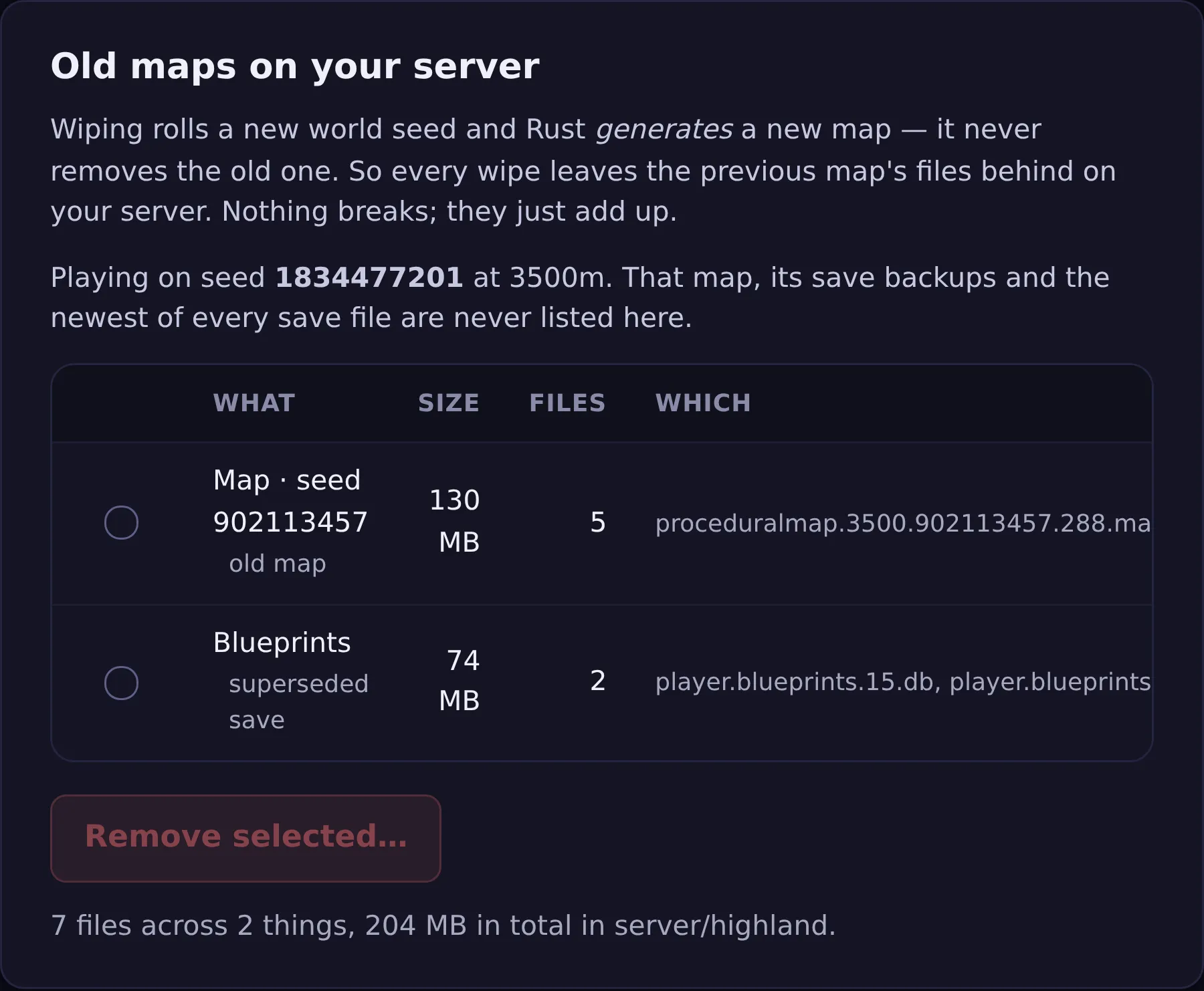
Nothing is deleted without you seeing the actual filenames first. That is the whole design. Clearing files is the one thing CerebRUST does that cannot be undone, so it is deliberately not part of a wipe and never happens automatically: you open the tab, read the list, tick what you want gone, and confirm against a second list of exactly those files.
It also re-checks at the moment you confirm, not just when the page loaded. If you happen to wipe onto a map that was on the list, that file is quietly left alone and the page tells you it was.
You need SFTP or a game panel connected — the same connection wiping needs. On a panel you also
need the file.delete box ticked, which is new; see Game panel.
What is not built yet
Section titled “What is not built yet”Wiping blueprints and player data between force wipes. This is a different thing from clearing their old versions, which Save hygiene does today. Wiping them means deleting the files Rust currently has open, and that can only be done with the server stopped — which needs a game panel, because SFTP cannot stop a server. Until that exists:
- Map wipes work, provided CerebRUST can write a new world seed — that means SFTP or a game panel connected and tested. The plugin on its own cannot change a map that already exists.
- Blueprint and full wipes are refused rather than quietly doing a map wipe, so you are never told your blueprints went when they did not. On force wipe they go anyway, as above.
Wiping without changing the map is refused for the same reason. Rolling the seed is what wipes the map today, so “wipe but keep this seed” has no mechanism — it would restart your server and change nothing.
What each part needs
Section titled “What each part needs”| To do this | You need |
|---|---|
| Count down to your wipe | Nothing — the plugin, and a schedule you filled in |
| Tell staff a day before | The same, plus their linked Discord accounts |
| Wipe the map (manually or on a schedule) | SFTP or a game panel, connected and tested |
| Wipe blueprints on force wipe | Nothing — Rust does it |
| Wipe blueprints at any other time | Not built yet; will need a game panel |
| Clear out old maps and old save versions | SFTP or a game panel — the Save hygiene tab |
The Automation tab says which of these your server is set up for, read from what CerebRUST has actually managed to do on your host — not from what is configured. An integration you have saved but never pressed Test on grants nothing, on purpose.